
Staring at a tangled mess of colorful fiber optic cables and wondering which one is which? You’re not alone. Whether you’re installing a new link or troubleshooting a network fault, misidentifying a fiber type is a costly mistake.
This guide cuts through the confusion. We’ll break down the TIA-598 color code standard—the industry’s universal language—into a simple, actionable system. You’ll learn how to identify single-mode vs. multimode at a glance, trace individual strands in a 144-fiber bundle, and avoid the critical error of mixing connector types.
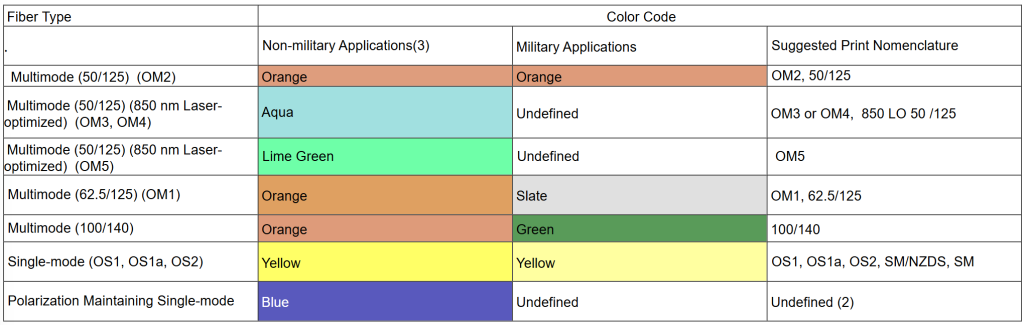
Fiber Cable Jacket Color Chart Quick View
Why Color Codes Are Your First Line of Defense
In fiber optics, color isn’t for decoration; it’s a critical safety and efficiency tool. The TIA-598 standard (specifically the current 598-D revision) exists to prevent two major issues:
- Mode Mismatch: Plugging multimode into a single-mode port (or vice versa) causes catastrophic signal loss.
- Polish Mismatch: Connecting an APC (angled) connector to a UPC (flat) port can physically damage the equipment.
By following the color code, you can visually verify compatibility before making a connection, saving hours of troubleshooting and preventing costly damage.
The Quick-Reference Fiber Jacket Color Chart
The outer jacket color is the fastest way to identify the cable’s core functionality. This chart follows the TIA-598-Dstandard for non-military indoor cables.
| Tipo de fibra | Jacket Color | Common Application |
|---|---|---|
| Single-Mode (OS1/OS2) | Yellow | Long-haul telecom, backbone networks |
| Multimode OM1 | Orange | Legacy LANs (62.5µm core) |
| Multimode OM2 | Orange | Short-distance gigabit (50µm core) |
| Multimode OM3 | Aqua (Teal) | 10G/40G data centers (laser-optimized) |
| OM4 multimodo | Aqua or Violet | High-speed data centers (enhanced) |
| Multimode OM5 | Lime Green | Wideband multimode for SWDM |
| Polarization-Maintaining | Azul | Specialized sensing/lab equipment |
Critical Exception: Outdoor cables are almost always black (for UV resistance), regardless of the fiber inside. For these, you must read the printed legend on the jacket.
The Inner Fiber Sequence: Tracing 12 Strands and Beyond
When you crack open a multi-fiber cable, you’re greeted with a rainbow of individual buffered fibers. The TIA-598 standard defines a specific 12-color sequence for identifying individual strands. This is crucial for splicing and patching.
The standard sequence is:
- Azul
- Orange
- Verde
- Brown
- Slate (Gray)
- Blanco
- Red
- Negro
- Yellow
- Violet
- Rose (Pink)
- Aqua
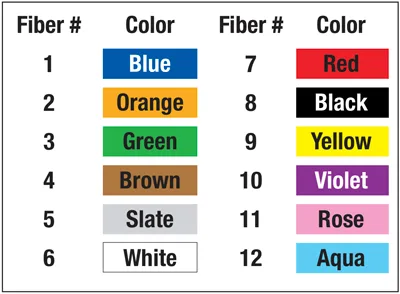
How it scales: For cables with more than 12 fibers (e.g., 24, 48, 144), the sequence repeats. Fibers 13-24 will follow the same order but are often marked with a contrasting stripe or binder.
Connector Colors: Don’t Mix the Blue and Green
The color of the connector body or boot tells you about the fiber type and, more importantly, the polish type. This is where a visual check can save your gear.
| Connector/Boot Color | Tipo de fibra | Polish | Advertencia |
|---|---|---|---|
| Azul | Single-Mode | UPC | Standard for single-mode patch panels. |
| Verde | Single-Mode | APC | Angled polish. Never mix with blue UPC. |
| Beige/Black | Multimode (OM1/OM2) | UPC | Common for older multimode installations. |
| Aqua | Multimode (OM3/OM4) | UPC | Standard for high-speed data center patches. |
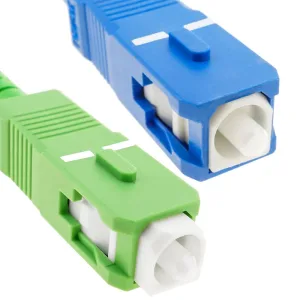
The Golden Rule: Never force a green (APC) connector into a blue (UPC) port. The angled polish is designed to minimize back-reflection, and mixing them will cause high loss and potential physical damage.
Step-by-Step: How to Identify an Unknown Fiber
Follow this JTBD (Job-to-Be-Done) workflow when you find an unlabeled cable:
- Check the Jacket: Is it Orange (Multimode) or Yellow (Single-mode)? This is your first clue.
- Read the Print: Look for abbreviations like “OM3,” “OS2,” or “SM” printed on the jacket. This overrides color if there’s a discrepancy.
- Inspect the Connector: A blue or green boot indicates single-mode. A beige or aqua boot indicates multimode.
- Verify Compatibility: Before patching, ensure the connector color matches the port type on your panel. If the panel is green (APC), your patch cord must be green.
Common Pitfalls and How to Avoid Them
Even with standards, here’s where technicians get tripped up:
- The OM3/OM4 Ambiguity: Both are often Aqua. You cannot reliably distinguish them by color alone—you must check the printed specs.
- Outdoor Cables: Remember, they’re black. Don’t assume it’s single-mode; always read the legend.
- Manufacturer Variations: Some vendors use custom colors (e.g., magenta for OM4). When in doubt, trust the printed text on the cable, not the color.
Beyond the Basics: When Color Isn’t Enough
While color coding is an essential tool, it’s not infallible. For mission-critical infrastructure or legacy systems with non-standard wiring, relying solely on visual identification is risky.
Aquí es donde professional fiber documentation and labeling systems become invaluable. By implementing a standardized labeling scheme that complements the color code, you eliminate guesswork entirely, ensuring every patch and splice is 100% accurate.
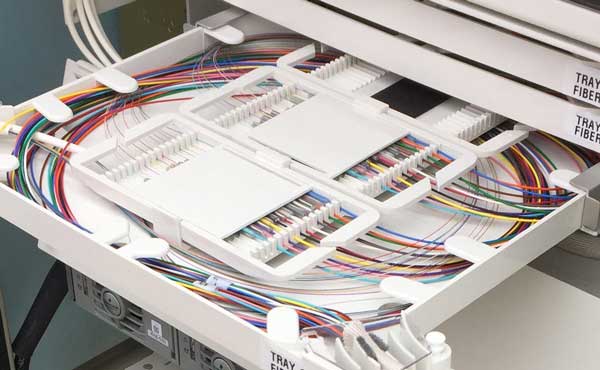
Ready to eliminate fiber identification errors for good? If you’re managing a complex data center or network, consider upgrading to a pre-labeled, high-density fiber solution. Our systems are designed to integrate seamlessly with TIA-598 standards, providing the visual clarity of color coding with the absolute certainty of machine-readable labels. Contact [email protected] for a customized consultation to streamline your fiber management.